เลือก backend Node.js ให้ลอง API งานเดียวกันก่อน บทความนี้สร้างรายการงานในหน่วยความจำด้วย Express, Fastify และ NestJS รับ JSON ตรวจข้อมูล และทดสอบคำตอบจริง เพื่อเห็นทั้งสิ่งที่ framework ช่วยกับโค้ดที่เราต้องดูแลเอง
เทียบก่อนติดตั้ง
| ตัวเลือก | เหมาะกับจุดเริ่มแบบไหน | สิ่งที่ต้องตัดสินใจ |
|---|---|---|
| Express | ทีมที่อยากเริ่มจาก route และ middleware แล้วเลือกส่วนประกอบเอง | ต้องวาง validation, โครงสร้างโปรเจกต์ และ error contract |
| Fastify | API ที่ใช้ schema และ plugin เป็นส่วนประกอบหลัก | ต้องเข้าใจลำดับ hook, schema และตัวเลือกการแปลงข้อมูล |
| NestJS | ทีมที่ต้องการ controller, service และ dependency injection เป็นแบบแผน | มี configuration และแนวคิดเพิ่ม; ยังต้องเลือก adapter และชั้นข้อมูล |
เปิด ตาราง Express / Fastify / NestJS หรือดูรายละเอียด Express, Fastify, NestJS ได้ ตัวอย่าง NestJS นี้ใช้ Express adapter ตามค่าเริ่มต้น การเลือก NestJS จึงไม่ได้แปลว่าเลิกใช้ Express เสมอไป; การเปลี่ยนเป็น Fastify adapter ต้องตรวจ package ที่ผูกกับ adapter อีกครั้ง
เตรียม environment และขอบเขต API
Reefsight ตรวจตัวอย่างวันที่ 18 ตุลาคม 2026 บน macOS arm64, Node.js 22.23.1 และ npm 10.9.8 ติดตั้ง Express 5.3.0, Fastify 5.12.7 และ NestJS 12.1.3 แยกโฟลเดอร์กัน NestJS ชุดนี้คอมไพล์ด้วย TypeScript 6.0.3; Express/Fastify เป็น JavaScript แบบ ESM คำสั่ง shell ด้านล่างทดสอบบนเครื่องนี้ ไม่ได้ทดสอบ Windows หรือ container
node --version
npm --version| คำขอ | ผลที่คาดเมื่อเพิ่งเริ่ม server |
|---|---|
| GET /tasks | 200 และ [] |
| POST /tasks พร้อม {"title":"เรียน backend"} | 201 และ {"id":1,"title":"เรียน backend"} |
| GET /tasks/1 | 200 และงานที่สร้าง |
| title หาย/ไม่ใช่ string/ว่าง/ยาวเกิน 80 code points หรือมี field เกิน | 400 |
| GET /tasks/999 หรือ id ไม่ถูกต้อง | 404 |
ตัดช่องว่างหัวท้ายก่อนนับ Unicode code points ด้วย spread ใน JavaScript หรือ schema ของ Fastify หนึ่งอีโมจิอาจมีหลาย code points จึงไม่ใช่การนับตัวอักษรที่มองเห็นทุกกรณี เก็บงานใน array เพื่อให้ลองได้ทันที เมื่อ restart ข้อมูลหายและแต่ละโปรเซสมีชุดข้อมูลของตัวเอง ยังไม่มีฐานข้อมูลหรือระบบสมาชิก
Express: route และ middleware แบบตรงไปตรงมา
mkdir express-demo
cd express-demo
npm init -y
npm pkg set type=module 'scripts.start=node server.mjs'
npm install --save-exact express@5.3.0
สร้าง server.mjs:
import express from 'express';
const app = express();
app.use(express.json({limit: '1kb'}));
const tasks = [];
function titleOf(body) {
  if (!body || typeof body !== 'object' || Array.isArray(body) ||
      Object.keys(body).some(key => key !== 'title') || typeof body.title !== 'string') return null;
  const title = body.title.trim();
  return [...title].length >= 1 && [...title].length <= 80 ? title : null;
}
app.get('/tasks', (_req, res) => res.json(tasks));
app.get('/tasks/:id', (req, res) => {
  const task = /^[1-9]\d*$/.test(req.params.id) && tasks.find(t => t.id === Number(req.params.id));
  return task ? res.json(task) : res.status(404).json({error: 'Task not found'});
});
app.post('/tasks', (req, res) => {
  const title = titleOf(req.body);
  if (title === null) return res.status(400).json({error: 'Send only title, 1–80 code points after trim'});
  const task = {id: tasks.length + 1, title};
  tasks.push(task);
  res.status(201).json(task);
});
app.use((err, _req, res, _next) => {
  const status = [400, 413].includes(err.status) ? err.status : 500;
  res.status(status).json({error: status === 500 ? 'Internal error' : 'Invalid JSON request'});
});
app.listen(Number(process.env.PORT || 3101), '127.0.0.1');
รัน npm start แล้วเปิด http://127.0.0.1:3101/tasks ลำดับ express.json() ก่อน route ทำให้ handler อ่าน body ได้ ส่วน middleware สี่อาร์กิวเมนต์ท้ายไฟล์รับ error จาก JSON parser และเก็บ error ที่ไม่คาดคิดเป็น 500 รูปแบบนี้ยังไม่ได้ออกแบบ logging และ error contract สำหรับระบบจริง
Fastify: ให้ schema ตรวจ body และใช้ hook เตรียมค่า
mkdir fastify-demo
cd fastify-demo
npm init -y
npm pkg set type=module 'scripts.start=node server.mjs'
npm install --save-exact fastify@5.12.7
สร้าง server.mjs:
import Fastify from 'fastify';
const app = Fastify({bodyLimit: 1024, ajv: {customOptions: {coerceTypes: false, removeAdditional: false}}});
const tasks = [];
app.get('/tasks', async () => tasks);
app.get('/tasks/:id', async (req, reply) => {
  const task = /^[1-9]\d*$/.test(req.params.id) && tasks.find(t => t.id === Number(req.params.id));
  return task || reply.code(404).send({error: 'Task not found'});
});
app.post('/tasks', {preValidation: async req => {
  if (typeof req.body?.title === 'string') req.body.title = req.body.title.trim();
}, schema: {body: {
  type: 'object', required: ['title'], additionalProperties: false,
  properties: {title: {type: 'string', minLength: 1, maxLength: 80}}
}}}, async (req, reply) => {
  const title = req.body.title.trim();
  if (!title) return reply.code(400).send({error: 'Title must not be blank'});
  const task = {id: tasks.length + 1, title};
  tasks.push(task);
  return reply.code(201).send(task);
});
await app.listen({port: Number(process.env.PORT || 3102), host: '127.0.0.1'});
รัน npm start แล้วเปิด http://127.0.0.1:3102/tasks ตัวอย่างใช้ preValidation ตัดช่องว่างก่อน schema ตรวจ เปิด additionalProperties: false และตั้ง removeAdditional: false เพื่อให้ field เกินถูกปฏิเสธ ส่วน coerceTypes: false ทำให้เลข 123 ไม่ถูกแปลงเป็น string โดยเงียบ ๆ การตั้งค่านี้เป็นการตัดสินใจของตัวอย่าง ไม่ใช่อ้างว่าทุกแอป Fastify มีพฤติกรรมนี้โดยปริยาย
NestJS: แยก controller กับ service และ build TypeScript
ติดตั้งแบบ manual เพื่อเห็นองค์ประกอบขั้นต่ำ ไม่ต้องติดตั้ง CLI แบบ global:
mkdir nest-demo
cd nest-demo
npm init -y
npm pkg set type=commonjs 'scripts.build=tsc' 'scripts.start=node dist/main.js'
npm install --save-exact @nestjs/common@12.1.3 @nestjs/core@12.1.3 @nestjs/platform-express@12.1.3 reflect-metadata rxjs
npm install --save-dev --save-exact typescript@6.0.3 @types/node@22
สร้าง tsconfig.json:
{
  "compilerOptions": {
    "target": "ES2022",
    "module": "NodeNext",
    "moduleResolution": "NodeNext",
    "strict": true,
    "skipLibCheck": true,
    "experimentalDecorators": true,
    "emitDecoratorMetadata": true,
    "outDir": "dist",
    "types": [
      "node"
    ]
  },
  "include": [
    "main.ts"
  ]
}
สร้าง main.ts:
import 'reflect-metadata';
import {BadRequestException, Body, Controller, Get, Injectable, Module, NotFoundException, Param, Post} from '@nestjs/common';
import {NestFactory} from '@nestjs/core';

type Task = {id: number; title: string};
function titleOf(body: unknown): string {
  if (!body || typeof body !== 'object' || Array.isArray(body) ||
      Object.keys(body).some(key => key !== 'title') ||
      !('title' in body) || typeof body.title !== 'string') throw new BadRequestException('Send only title');
  const title = body.title.trim();
  if ([...title].length < 1 || [...title].length > 80) throw new BadRequestException('Title must contain 1–80 code points');
  return title;
}
@Injectable()
class TasksService {
  private readonly tasks: Task[] = [];
  list() { return this.tasks; }
  find(id: string) {
    const task = /^[1-9]\d*$/.test(id) && this.tasks.find(t => t.id === Number(id));
    if (!task) throw new NotFoundException('Task not found');
    return task;
  }
  create(title: string) {
    const task = {id: this.tasks.length + 1, title};
    this.tasks.push(task);
    return task;
  }
}
@Controller('tasks')
class TasksController {
  constructor(private readonly tasks: TasksService) {}
  @Get() list() { return this.tasks.list(); }
  @Get(':id') find(@Param('id') id: string) { return this.tasks.find(id); }
  @Post() create(@Body() body: unknown) { return this.tasks.create(titleOf(body)); }
}
@Module({controllers: [TasksController], providers: [TasksService]})
class AppModule {}
async function main() {
  const app = await NestFactory.create(AppModule);
  await app.listen(Number(process.env.PORT || 3103), '127.0.0.1');
}
void main();npm run build
npm startเปิด http://127.0.0.1:3103/tasks Nest จัดการสร้าง service และส่งเข้า controller จาก providers ใน module ส่วนการรับ body เป็น unknown ทำให้โค้ดต้องตรวจก่อนใช้ TypeScript type ไม่ได้ตรวจ JSON ตอน runtime เอง ชุดนี้ตรวจด้วยฟังก์ชันเพื่อให้เทียบได้ง่าย งานใหญ่ขึ้นควรประเมิน DTO, ValidationPipe และ error contract แยกจาก controller; อย่าเปลี่ยน type annotation แล้วถือว่า validate แล้ว
ลองส่งข้อมูล แล้วรันทดสอบเหมือนกันทั้งสามชุด
เลือก port 3101, 3102 หรือ 3103 ตาม server ที่เปิดไว้:
curl -i http://127.0.0.1:3101/tasks
curl -i -X POST http://127.0.0.1:3101/tasks -H 'Content-Type: application/json' -d '{"title":"เรียน backend"}'
curl -i http://127.0.0.1:3101/tasks/1
สำหรับ test ให้หยุดแล้วเริ่ม server ใหม่ก่อน เพราะ test คาดว่า array ยังว่าง บันทึกไฟล์ smoke-test.mjs เหมือนกันในแต่ละโฟลเดอร์:
import {test} from 'node:test';
import assert from 'node:assert/strict';
const base = `http://127.0.0.1:${process.env.PORT || 3101}`;
test('tasks API on a freshly started server', async () => {
  const send = body => fetch(base + '/tasks', {method: 'POST', headers: {'Content-Type': 'application/json'}, body: JSON.stringify(body)});
  assert.deepEqual(await (await fetch(base + '/tasks')).json(), []);
  const created = await send({title: '  เรียน backend  '});
  assert.equal(created.status, 201);
  assert.deepEqual(await created.json(), {id: 1, title: 'เรียน backend'});
  assert.deepEqual(await (await fetch(base + '/tasks/1')).json(), {id: 1, title: 'เรียน backend'});
  assert.equal((await (await fetch(base + '/tasks')).json()).length, 1);
  for (const body of [{}, {title: 123}, {title: '  '}, {title: 'x', extra: true}, [], {title: '😀'.repeat(81)}]) assert.equal((await send(body)).status, 400);
  assert.equal((await send({title: '😀'.repeat(80)})).status, 201);
  assert.equal((await fetch(base + '/tasks', {method: 'POST', headers: {'Content-Type': 'application/json'}, body: '{broken'})).status, 400);
  for (const id of ['999', '0', 'abc']) assert.equal((await fetch(base + '/tasks/' + id)).status, 404);
});
เปิดอีก terminal ในโฟลเดอร์เดียวกันแล้วรันหนึ่งคำสั่งตามตัวที่ทดสอบ:
PORT=3101 node --test smoke-test.mjs
# Fastify: PORT=3102 node --test smoke-test.mjs
# NestJS: PORT=3103 node --test smoke-test.mjs
Reefsight รันทดสอบบน server ใหม่แยกกันครบ 45 คำขอ HTTP: สร้าง/อ่านงาน, trim, field เกิน, ชนิดผิด, JSON เสีย, id ที่ไม่มี และอีโมจิ 80/81 code points ทั้งสามตัวผ่าน NestJS build ผ่านด้วย รูปแบบ JSON ของ error ยังต่างกัน เราเทียบ status และพฤติกรรมตามสัญญาที่กำหนด ไม่ได้อ้างว่า error payload ทุกตัวเหมือนกัน
ผลสำรวจช่วยให้เห็นบริบท แต่ไม่ตัดสินแทนงานของเรา
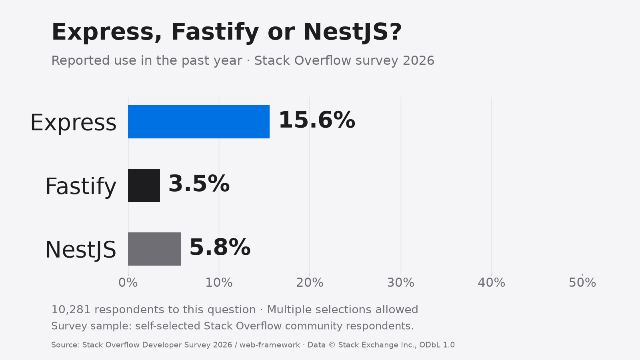
Stack Overflow Developer Survey 2026 คำถาม WebFramework มีผู้ตอบ 10,281 คน: Express 15.6% (1,604 คน), Fastify 3.5% (355 คน), NestJS 5.8% (600 คน) เป็นการรายงานการใช้งานในปีที่ผ่านมาและเลือกได้หลายข้อ กลุ่มตัวอย่างสมัครใจตอบ ไม่ใช่ส่วนแบ่งตลาดไทย จำนวนแอปจริง หรือผลวัดความเร็ว และไม่ได้แยก adapter/เวอร์ชันที่ใช้
ปกวาดใหม่จากข้อมูลนี้โดย Reefsight เครดิตข้อมูล Stack Exchange Inc. ภายใต้ ODbL 1.0 อ่าน ข้อมูลต้นทาง, วิธีสำรวจ และ เงื่อนไข ODbL ประกอบ ไม่ใช้ตัวเลขจากผู้ตอบชุดเดียวกันที่ปรากฏหลายหน้าภาษามาบวกซ้ำ
ต่อ chain ไปสู่บริการจริง
เริ่มจาก Node.js → framework ที่ลอง → การจัดเก็บข้อมูลและ migration → การทดสอบและวิธีรันจริง โดยเลือกเฉพาะชั้นที่งานต้องใช้ NestJS มี Express adapter และตัวเลือก Fastify adapter; ส่วน data layer เป็นการตัดสินใจแยก เช่น Prisma, Knex หรือ Mongoose ต้องเลือกให้ตรงฐานข้อมูลและตรวจ integration ก่อน ไม่ใช่ dependency ที่ตัวอย่างนี้ติดตั้งให้แล้ว
เก็บ package-lock.json แล้วใช้ npm ci เมื่อติดตั้งซ้ำ แยก config/secret ออกจาก source เพิ่มฐานข้อมูลถาวร auth และสิทธิ์รายงาน ตรวจขนาด request, rate limit, logging, HTTPS, graceful shutdown และการดูแล process ก่อนเปิดสาธารณะ ตัวอย่าง bind เฉพาะ 127.0.0.1; อย่าเปลี่ยน host เพื่อเปิดอินเทอร์เน็ตทั้งที่ยังไม่มีมาตรการที่จำเป็น
รอบนี้ไม่ได้วัด throughput/latency ไม่ได้ทดสอบฐานข้อมูล, authentication, หลายโปรเซส หรือ deploy production จึงยังใช้สรุปไม่ได้ว่าตัวใดเร็วที่สุดหรือเหมาะกับทุกระบบ
เอกสารที่ใช้ตรวจ
- Express: ติดตั้ง, routing, error handling
- Fastify: เริ่มต้น, validation, testing
- NestJS: เริ่มต้น, controller, provider, validation, Fastify adapter
- Node.js: test runner